Overview
Bronto’s Kinesis Firehose integration lets you stream data directly from an Amazon Data Firehose delivery stream into Bronto over HTTP. It is well suited to high-throughput pipelines where data already flows through Kinesis, to services that deliver natively to Firehose (CloudFront real-time logs, Route 53 Resolver query logs, SES events, ElastiCache logs), and to CloudWatch-native services routed to Firehose via a subscription filter (CloudTrail, RDS/Aurora, API Gateway, Route 53 public query logging).
The integration requires no Lambda function. Firehose delivers data directly to Bronto’s HTTP endpoint, handling batching, compression, and retries natively.
When to Use Firehose
| Situation | Recommendation |
|---|
| Data already in a Kinesis Data Stream | Firehose is the natural choice |
| A service that delivers natively to Firehose | Firehose captures the full-fidelity record |
| Very high event volume (GB/hour+) | Firehose scales without additional Lambda cost |
| You want managed delivery with built-in retries | Firehose handles this natively |
| Application or container logs | Use ADOT or the CloudWatch Log Forwarder instead |
Bronto Ingestion Endpoint
Firehose delivers to Bronto’s dedicated AWS HTTP endpoint:
| Region | Endpoint URL |
|---|
| EU | https://ingestion.eu.bronto.io/aws/logs/ |
| US | https://ingestion.us.bronto.io/aws/logs/ |
| Setting | Value |
|---|
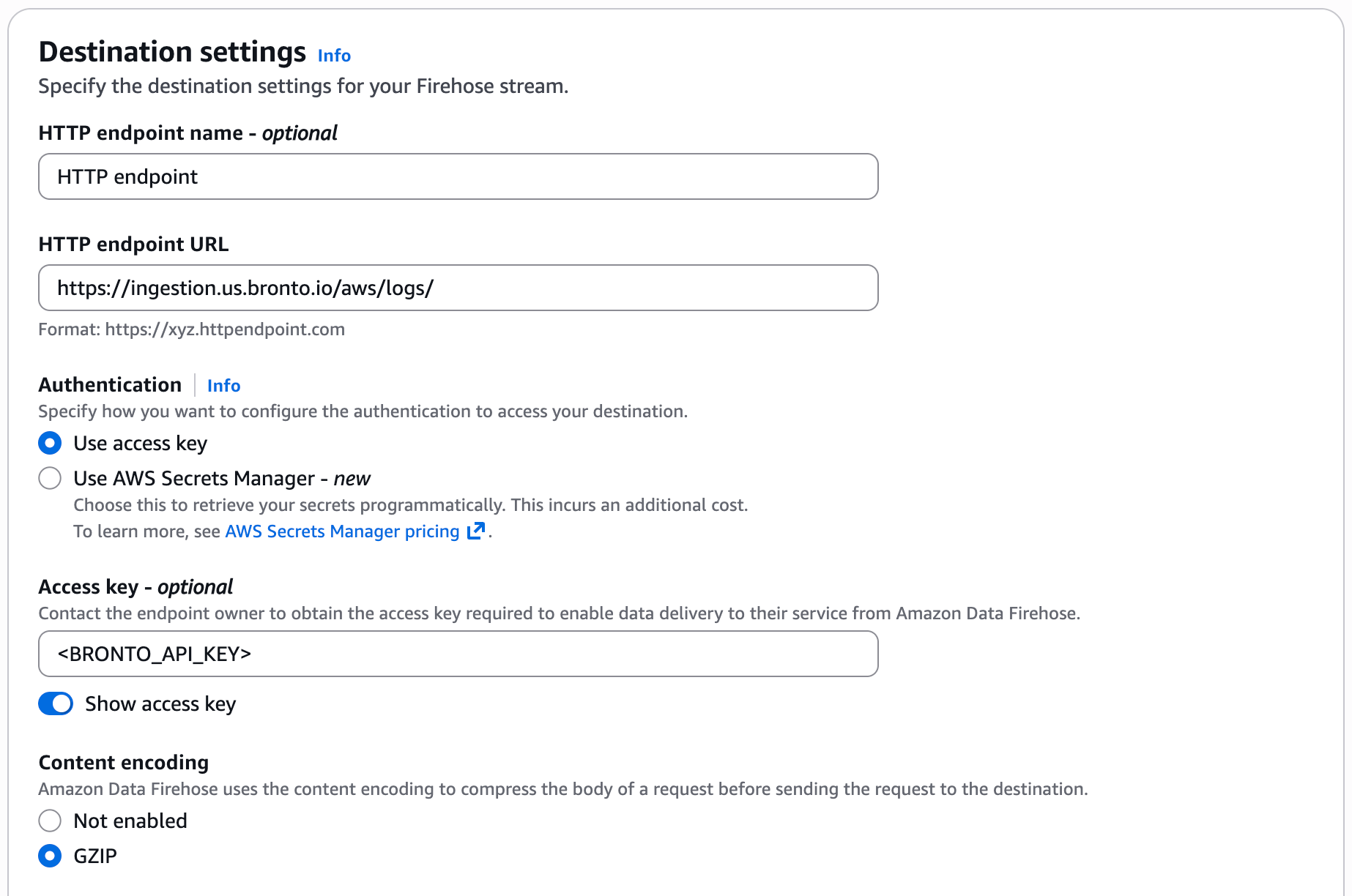
| HTTP endpoint URL | https://ingestion.<REGION>.bronto.io/aws/logs/ |
| Access key | Your Bronto API key — sent by Firehose in the X-Amz-Firehose-Access-Key header |
| Content encoding | GZIP |
No log_format parameter is needed. Bronto auto-detects the payload shape — it unwraps CloudWatch Logs subscription envelopes and parses JSON record bodies automatically. See Supported record formats below. 200 with Content-Type: application/json and a body of the form {"requestId":"<echoed-id>","timestamp":<epoch_ms>}. Firehose may send up to 500 records per request.
Data Organization
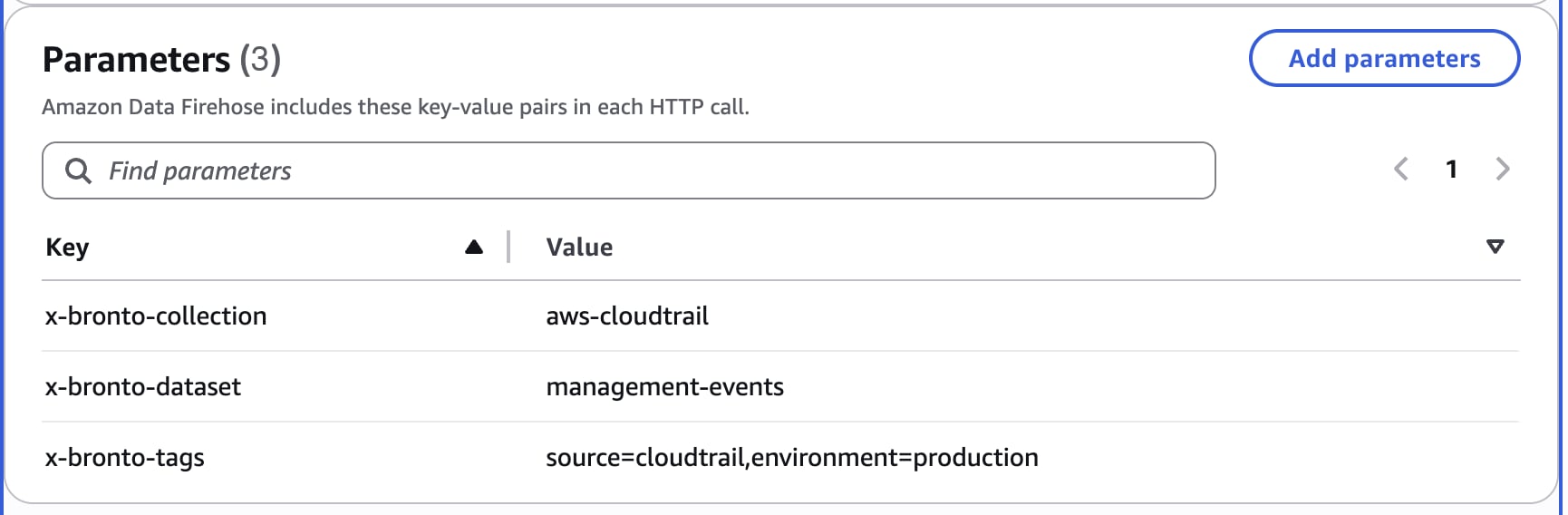
Set Bronto’s routing headers as the HTTP endpoint Common attributes on the delivery stream. Firehose delivers them in the X-Amz-Firehose-Common-Attributes JSON header. See Data Organization for how datasets, collections, and tags work.
| Common attribute | Description |
|---|
x-bronto-dataset | Dataset to ingest into |
x-bronto-collection | Collection name |
x-bronto-tags | Comma-separated tags to attach to events |
Bronto detects field extraction from the record body, not the service that produced it. Two tiers of record body are decoded automatically; delimited and positional text formats are stored raw and require a custom parser.
Services that reach Firehose through CloudWatch Logs → subscription filter → Firehose deliver a gzip-compressed CloudWatch Logs subscription envelope (DATA_MESSAGE containing one or more logEvents). Bronto unwraps it automatically:
- One stored event per
logEvent.
- CloudWatch Logs metadata is preserved under
$logGroup, $logStream, $messageType, $owner, and related fields.
- Firehose delivery metadata is preserved under
$firehose.requestId, $firehose.sourceArn, and $firehose.timestamp.
- Each
logEvent message is then parsed by its own format — JSON bodies are flattened (below), delimited text is stored raw.
This covers every service that exports via a CloudWatch Logs subscription filter, including CloudTrail, RDS/Aurora, API Gateway, and Route 53 public query logging.
JSON record bodies
Records delivered directly to Firehose as JSON objects are parsed and flattened into searchable fields, with nested keys expressed in dot notation (for example mail.destination.0, answers.0.Rdata, httpRequest.clientIp). No configuration is required. Verified for Amazon SES events, Route 53 Resolver query logs, AWS WAF logs (native JSON), and ElastiCache logs when the JSON log format is selected on the AWS side.
AWS requires a WAF logging delivery stream’s name to start with aws-waf-logs- before WAF will accept it as a destination.
@raw) but are not field-extracted automatically. Each requires a Bronto custom parser:
| Source | Record shape |
|---|
| CloudFront real-time logs | TAB-delimited, fixed field order, unselected fields rendered as - |
| Route 53 public query logging | Space-delimited line |
| RDS / Aurora plain-text logs | PostgreSQL stderr, MySQL slow-query blocks, Aurora audit CSV (heterogeneous) |
| ElastiCache TEXT format | Comma-delimited |
| VPC Flow Logs | Space-delimited v2 positional line (version account-id interface-id srcaddr dstaddr …) |
For positional formats (CloudFront real-time logs, VPC Flow Logs), the custom parser must be pinned to the exact field list and order configured on the AWS side — the order is fixed, but the selected subset varies per configuration, so map columns 1:1. Where a service offers a JSON log format (ElastiCache, API Gateway), prefer it to avoid writing a parser.
Setup
Step 1 — Create the Firehose delivery stream
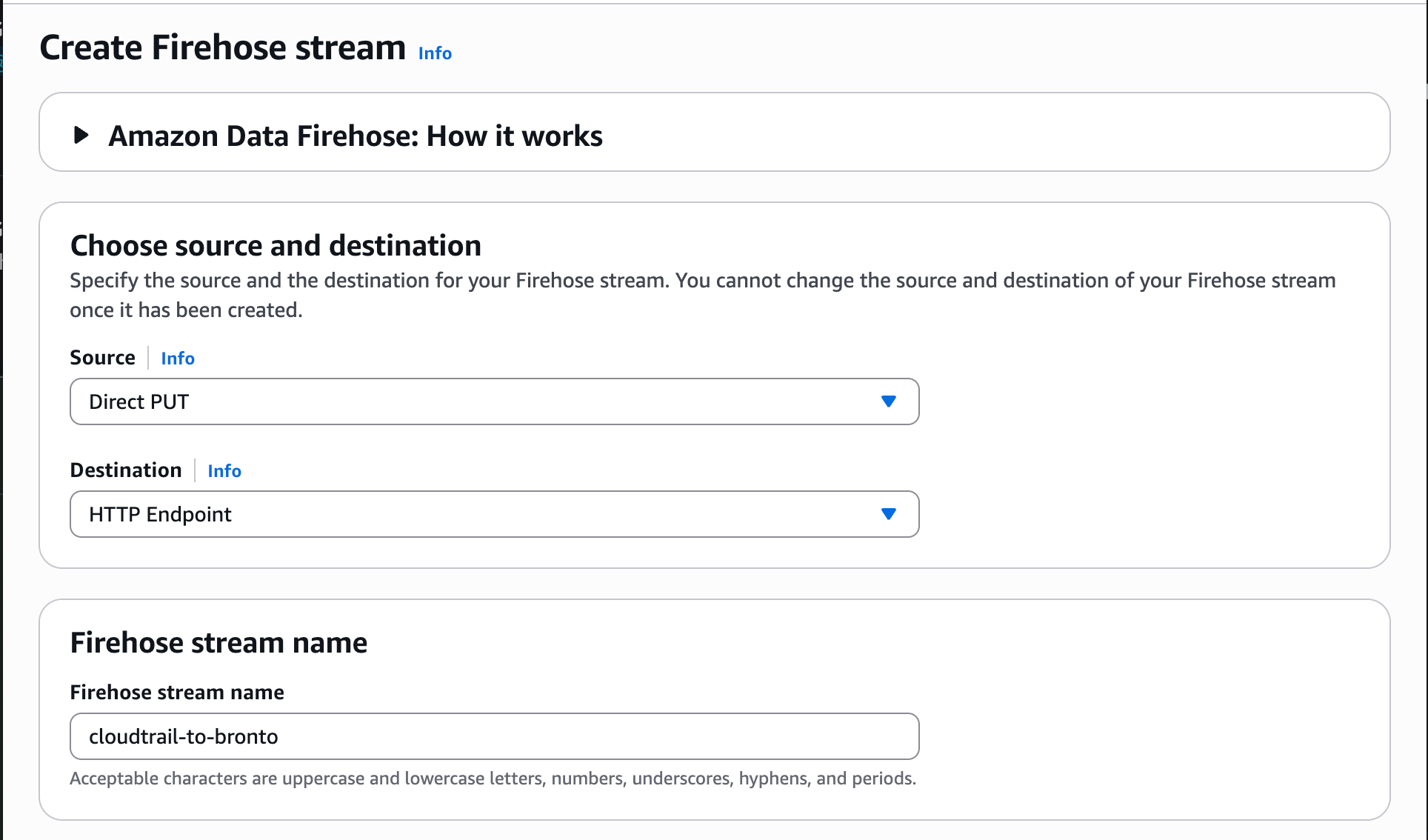
In the AWS Console, go to Amazon Data Firehose → Create Firehose stream. Choose the source that matches your service:
- Direct PUT — for services that publish directly to Firehose (SES, Route 53 Resolver, ElastiCache).
- Amazon Kinesis Data Streams — for CloudFront real-time logs, which deliver to a Kinesis Data Stream first.
Set the destination to HTTP Endpoint.
| Field | Value |
|---|
| HTTP endpoint URL | https://ingestion.<REGION>.bronto.io/aws/logs/ |
| Access key | <YOUR_API_KEY> |
| Content encoding | GZIP |
X-Amz-Firehose-Common-Attributes header), add x-bronto-collection, x-bronto-dataset, and optionally x-bronto-tags. No log_format parameter is needed — Bronto auto-detects the payload shape.
Step 3 — Connect the source (CloudWatch-native services)
For services that have no native Firehose export (CloudTrail, RDS/Aurora, API Gateway, Route 53 public query logging), first publish the service’s logs to a CloudWatch log group, then add a subscription filter on that log group targeting the Firehose stream. The subscription filter needs an IAM role trusting logs.amazonaws.com with permission to firehose:PutRecord* on the delivery stream.
CloudWatch Logs already compresses subscription data with gzip. Do not add a second compression layer in the delivery stream’s data transformation — set only the destination content encoding to GZIP as above.
Cost
Firehose pricing is based on the volume of data processed through the delivery stream (per GB). There are no Lambda compute costs. Services routed through CloudWatch Logs incur standard CloudWatch Logs ingestion charges in addition to Firehose costs.
For assistance, contact support@bronto.io.