

Core Concepts: Datasets & Collections
Log events in the Bronto Logging Platform are organized and stored in datasets and collections.Datasets
A Dataset (namedlog in the current API) is the fundamental unit of storage. It acts as a container for log events that share a similar format and origin, such as:
application-logsnginx-access
- All events within the same dataset are always queried together.
- The dataset must be specified at ingestion time by configuring the agent or integration.
- Dataset names must be unique within a collection.
Note
Bronto supports up to 5,000 unique datasets per organization.
Collections
A Collection (namedlogset in the current API) is a logical grouping of datasets.
Think of a collection as a folder that helps you organize related datasets and distinguish between datasets that may share the same name but come from different environments.
Key points:
- Collections improve discoverability and organization.
- The collection can be specified using the
x-bronto-collectionHTTP header (or equivalent). - Collection configuration is described in the agent setup documentation.
Tags
Tags are key-value pairs assigned to datasets to categorize them across your system, for example:team:backendenv:productiontype:gcservice:catalog
- Select datasets in the UI
- Query multiple datasets together
- Build precise dashboards and monitors at scale
Assigning Tags
You can assign tags to datasets in three ways:- Via UI: apply or remove tags from the Logs screen
- Via API: create tags and assign them programmatically
- At ingestion: automatically attach tags to ingested data via the
x-bronto-tagsHTTP header (agent-level)
Assign tags via the UI (Logs screen)
Use the UI when you want to quickly apply tags to a dataset.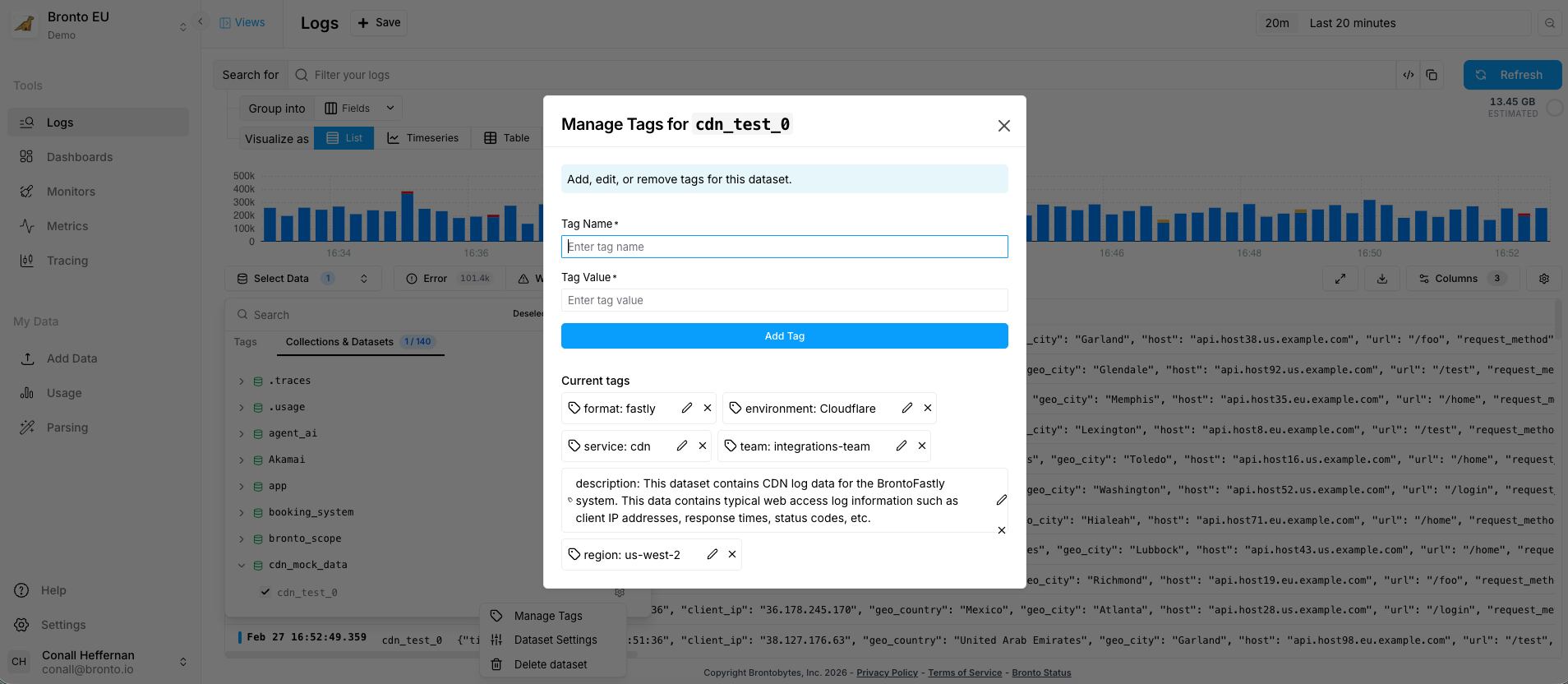
- In the left navigation, open Logs.
- Click Select Data dropdown.
- Expand the relevant Collection.
- Hover over the Dataset you want to tag.
- Click the settings icon.
- Select Manage Tags.
- Fill out Tag Name and Value.
- Click Add / Apply to confirm.
Assign tags via the API
Create a tag (and then assign/use it in your workflows) using the Tags API:Assign tags at ingestion (agent-level)
Use ingestion tagging when you want tags applied automatically as data enters Bronto. Tags must be specified at the agent level using thex-bronto-tags HTTP header (or your agent’s equivalent configuration). For example:
- Set
x-bronto-tagsto a comma-separated list of tags (example format may vary by agent). - The agent attaches those tags to any data it ingests.
Partition Tags
Partition Tags are a special subset of tags defined at the organization level. They allow Bronto to automatically organize your data in a consistent and scalable way. Partition tags are especially useful for:- Large environments
- Structured infrastructures
- Reducing agent configuration complexity
- Enforcing consistent collection and dataset placement
How Partition Tags Work
- Bronto uses partition tags to determine how incoming data is grouped into collections and datasets.
- If a collection header is explicitly set, it takes precedence and overrides partition tag logic.
- To fully leverage partition tags, omit the collection header during ingestion.
Setup Flow: UI + Ingestion Headers
- In Settings -> Partition Tags, enable partition tags and define the hierarchy order (broadest to most specific).
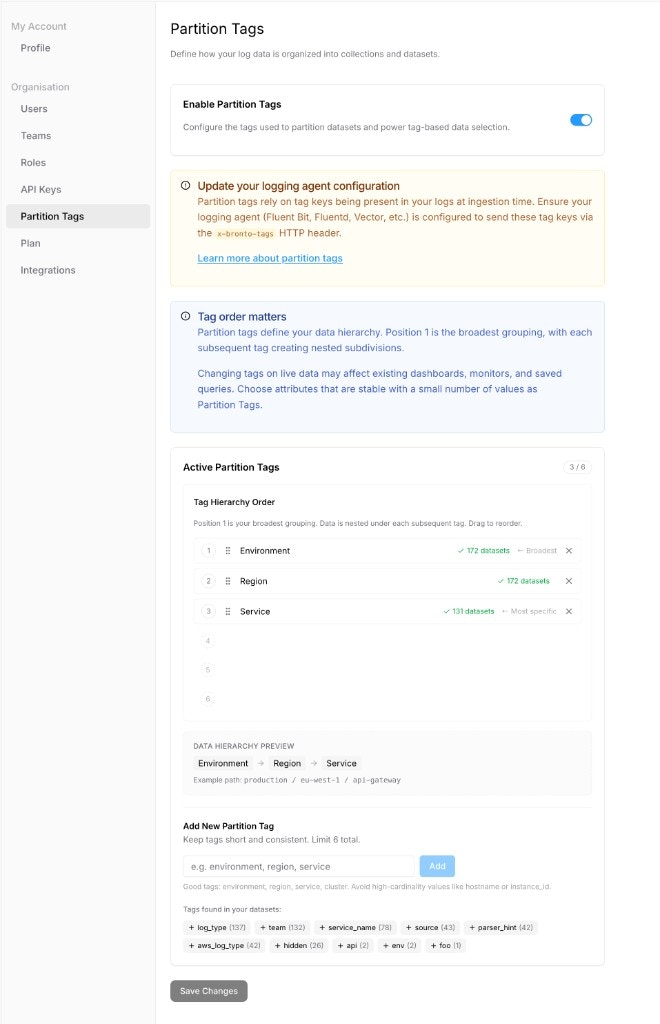
- Update your ingestion agent config so
x-bronto-tagsincludes the same tag keys you configured as partition tags.
- Open Logs and verify the partition tags appear in the dataset selector.
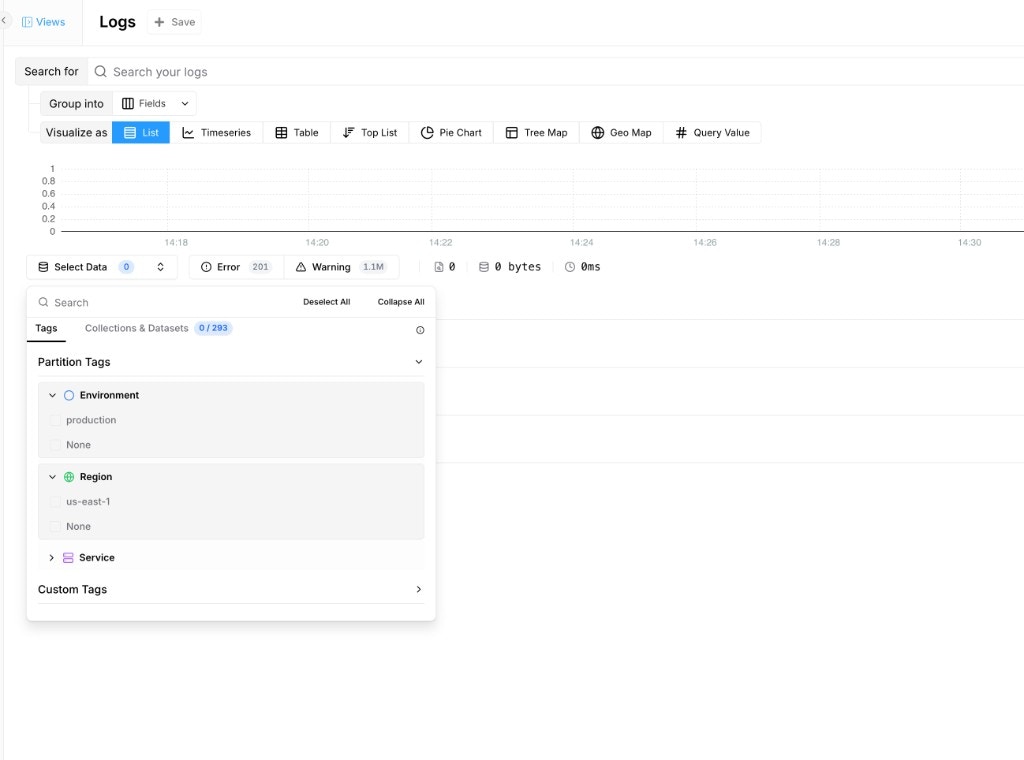
Choosing Your Partition Tags
Partition tags define your data hierarchy, so they should be chosen carefully—ideally during the initial account configuration.Characteristics of Good Partition Tags
Partition tags should:- Be low-cardinality
- Represent attributes that are intrinsically tied to the data source
- Remain stable over time
environmentregiondatacenteraccountclusterserviceproduct
team
Teams and responsibilities change frequently. Team ownership is valuable metadata, but not suitable for defining data hierarchy.- High-cardinality or volatile attributes such as:
hostnameinstance_idpod_idip_address
Warning
While partition tags can be modified at any time, changing them on live data is a sensitive operation. Updates may cause new datasets to be created for existing streams, potentially breaking dashboards, monitors, and saved queries.
Example: Designing Partition Tags
Context
Your infrastructure includes:- Environments:
staging,production - Regions:
eu,us - Services:
catalog,checkout,payment,cart - Teams:
team-a,team-b
- Syslog
- Application logs
- Garbage collection logs
Recommended Partition Tags
- environment
- region
- service
- These descriptors are stable and directly tied to where and what generates logs.
- They clearly identify the source of the data.
- They scale well as your infrastructure grows.
- The dataset name should represent the log stream (e.g.,
application,gc,syslog). - Collections and datasets are automatically and consistently organized.
Why Not Use team as a Partition Tag?
Team ownership changes over time. If a service moves from team-a to team-b:
- The partition tag combination changes
- New datasets are created for the same service
- Old datasets stop receiving data
- Existing dashboards, monitors, and queries may break or return incomplete results
Use
team as a regular tag, not a partition tag. This allows you to update ownership metadata without disrupting your data organization or historical visibility.