Run the OpenTelemetry Demo (Astronomy Shop) locally and route its logs, metrics, and traces to Bronto to explore real, correlated telemetry.
The OpenTelemetry Demo — the “Astronomy Shop” — is a microservices application maintained by the OpenTelemetry project. It runs around 20 services written in different languages, emits logs, traces, and metrics, and ships a built-in load generator that keeps realistic traffic flowing. It’s the fastest way to see what Bronto looks like with real, correlated data when you don’t yet have your own application instrumented.Because every service in the demo already exports to a bundled OpenTelemetry Collector, “trying Bronto” mostly means adding a Bronto exporter to a configuration you don’t have to write yourself.
Traces spanning the full checkout flow across services (frontend → cart → checkout → payment → shipping, and more).
Logs automatically correlated to those traces via trace_id, so you can jump from a log line to the request that produced it.
Metrics for request volume, latency, runtime behavior, and service health in the Metric Explorer.
A service.name per microservice, used to filter metrics and traces and mapped to a Bronto Dataset for logs only. Metrics and traces do not appear in datasets or collections.
Exponential histograms are not supported. For Sum, Summary, and Histogram metrics, use Rate of sum or Rate of count in the Metric Explorer to visualize per-second rates.
The demo’s Collector is designed to be extended. Add a Bronto otlphttp exporter and append it to the existing logs, metrics, and traces pipelines.
The OpenTelemetry Collector merges config files but replaces lists rather than appending to them. When you redefine a pipeline’s exporters, you must repeat the demo’s upstream exporters so they keep working alongside Bronto.
Docker Compose
Helm / Kubernetes
The demo provides a dedicated, normally-empty extension file for exactly this purpose. Edit src/otel-collector/otelcol-config-extras.yml:
src/otel-collector/otelcol-config-extras.yml
exporters: otlphttp/bronto: logs_endpoint: https://ingestion.eu.bronto.io/v1/logs metrics_endpoint: https://ingestion.eu.bronto.io/v1/metrics traces_endpoint: https://ingestion.eu.bronto.io/v1/traces compression: none headers: x-bronto-api-key: <BRONTO_API_KEY>service: pipelines: traces: # repeat the upstream exporters, then add Bronto exporters: [otlp_grpc/jaeger, debug, span_metrics, otlphttp/bronto] logs: exporters: [opensearch, debug, otlphttp/bronto] metrics: # repeat the current upstream exporters, then add Bronto exporters: [otlphttp/prometheus, debug, otlphttp/bronto]
Replace <BRONTO_API_KEY> with your key and adjust the region in both endpoints if you’re on US.
The upstream exporter names above (otlp_grpc/jaeger, span_metrics, opensearch, …) are listed in the comments at the top of otelcol-config-extras.yml. If a future version of the demo changes them, copy the current names from that file so you don’t drop the demo’s own backends.
Override the bundled Collector config through the chart’s values. Create bronto-values.yaml:
The same list-replace rule applies: include the chart’s existing exporters for each pipeline. Inspect the rendered defaults with helm show values open-telemetry/opentelemetry-demo if you’re unsure of the current names.
Avoid committing your API key. Reference a Kubernetes Secret instead, or pass the key with --set 'opentelemetry-collector.config.exporters.otlphttp/bronto.headers.x-bronto-api-key=<BRONTO_API_KEY>' at install time.
docker compose up --force-recreate --remove-orphans --detach
The web store is available at http://localhost:8080. The built-in load generator starts producing traffic automatically, so telemetry begins flowing without any manual clicks.
Within a minute or two, telemetry should appear in Bronto. Here are two quick things to try.
1
Follow a request across services
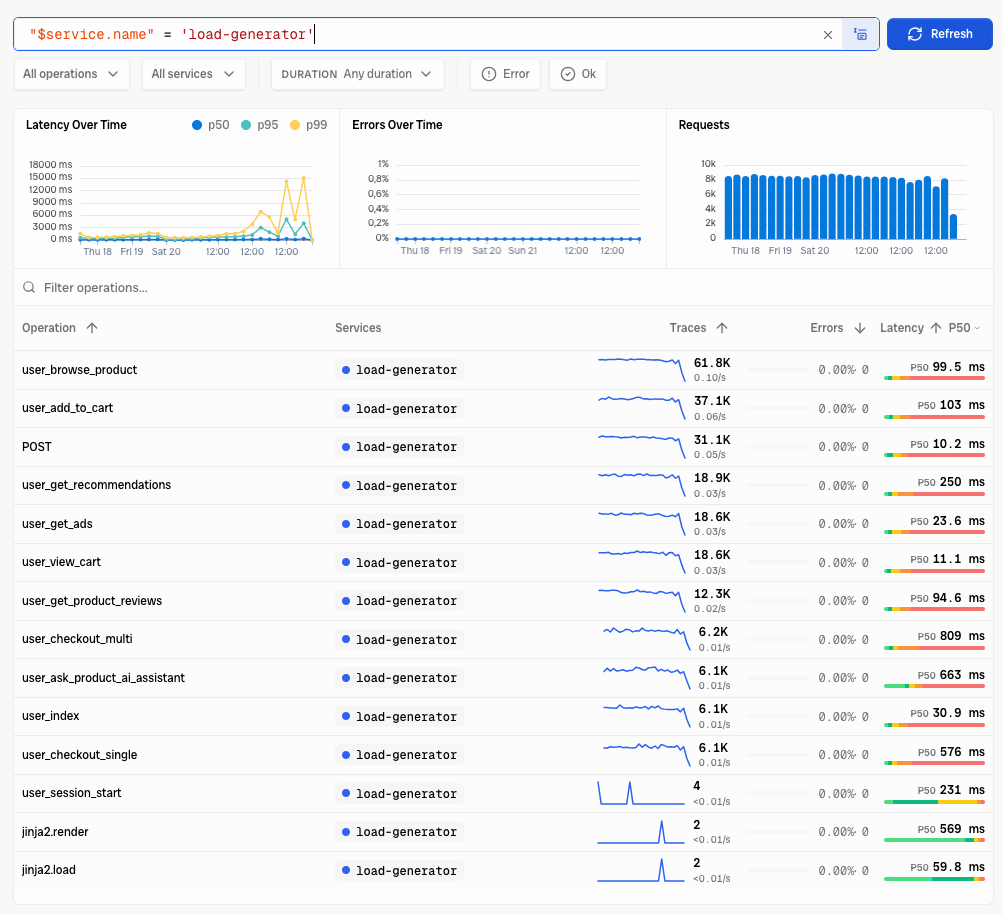
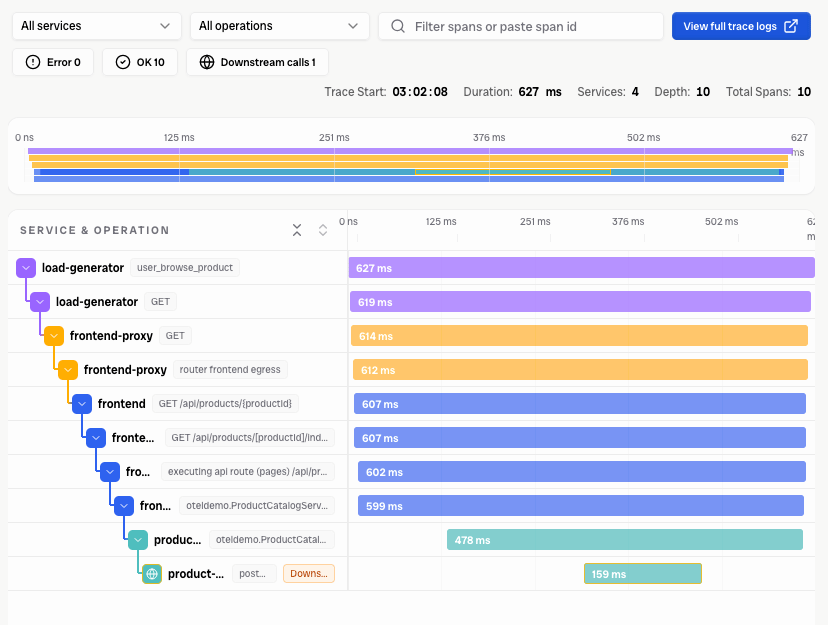
Open Explore Traces and pick a recent trace from the frontend service. Expand the spans to watch a single checkout request fan out across cart, currency, payment, and shipping. Click a span’s trace_id to pivot into the correlated logs for that exact request.
Operations from the demo's load generator in Bronto's trace explorer, with request rate, latency percentiles, and error rate per operation.
A single user_browse_product trace expanded into its waterfall — the request fans out across load-generator, frontend-proxy, frontend, and the product catalog service.
2
Explore metrics
Open the Metric Explorer and select a metric emitted by the demo. Filter by service.name to compare services, then use the result in a dashboard.
3
Ask questions with the MCP server
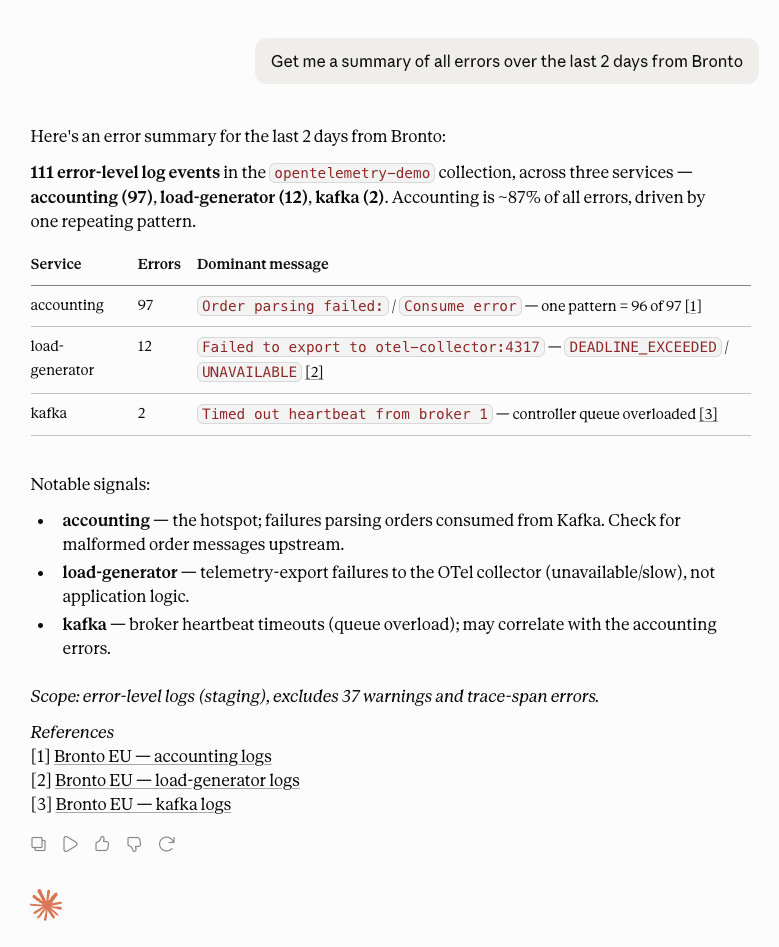
Connect the Bronto MCP server to your AI assistant and query the demo data in plain language — no query syntax required. Ask for an error summary, a latency outlier, or which service is failing, and let the assistant investigate across the demo’s logs and traces.
Claude using the Bronto MCP server to summarize errors across the OpenTelemetry Demo — it groups 111 error events by service and surfaces the likely root cause.
Want to generate errors on demand? The demo includes a feature-flag service that can inject failures (such as a failing payment or cart service). Toggling those flags is a good way to see how problems surface in Bronto’s traces and logs.