
MongoDB Atlas can push logs and metrics to Bronto’s OTLP endpoint itself, with no Collector on your side. Both integrations are under Project Settings → Integrations in Atlas. This page lists the Bronto values to enter. For the full Atlas steps, see MongoDB’s guides to OpenTelemetry Log Export and OpenTelemetry Metrics. For self-hosted MongoDB, see MongoDB logs and metrics with OpenTelemetry.

Prerequisites

  • A dedicated Atlas cluster (M10 or larger). Atlas Infinite clusters don’t support log export.
  • A Bronto API key with at least the Ingestion role (how to create one)
  • Your Bronto region, eu or us (see Endpoints)

Send metrics

In OpenTelemetry (OTel) Metrics, add a configuration with these values:
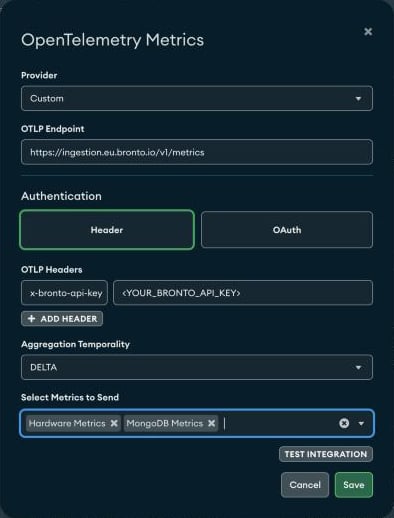
Atlas OpenTelemetry Metrics form with Provider Custom, the Bronto metrics endpoint, an x-bronto-api-key header, DELTA temporality, and Hardware Metrics and MongoDB Metrics selected
About 480 mongodb.* metrics appear in the Metric Explorer, for example mongodb.derived.server_status.op_latencies.*, mongodb.derived.replstatus.lag_milliseconds, and mongodb.conn_pool_stats.*.

Send logs

In OpenTelemetry Log Export, add a configuration with these values:
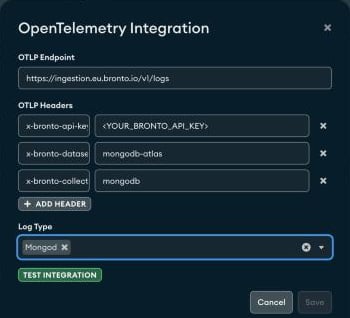
Atlas OpenTelemetry Log Export form with the Bronto logs endpoint, x-bronto-api-key, x-bronto-dataset, and x-bronto-collection headers, and log type Mongod
Without the optional headers, logs land in the mongodb-atlas dataset, default collection. Bronto parses each mongod JSON line into fields such as msg, c, s, ctx, and attr.* (attr.ns, attr.planSummary, attr.durationMillis). The resource attributes cluster.name, host.name, and log_type identify the source.

Search examples

See Search syntax for more.

Troubleshooting

If logs or metrics don’t arrive, contact Bronto Support.