

fetch span and how long it took, but nothing about what happened inside the other service. Vercel also can’t receive telemetry from services that run elsewhere.
To see the whole request, both sides send their spans to Bronto, and every call from Vercel carries the W3C traceparent header. The other service continues that trace, and Bronto shows one trace from the Vercel edge to the database behind your backend.
When to use this
- Your Vercel functions call an API, service or database that you run yourself somewhere else.
- You want to see where the time goes in a slow request, including inside the other service.
- You want logs from both sides to link to the same trace.
How the trace is connected
Three things have to be true:- The Vercel side records spans and sends them to Bronto, through a trace drain or an OTLP exporter in your code.
- Every outgoing call carries
traceparent. It holds the trace ID and the ID of the calling span. - The other service continues the trace and sends its spans to Bronto. Any OpenTelemetry SDK or agent reads
traceparentfrom incoming requests automatically.
Step 1: Propagate trace context from Vercel
Next.js and other frameworks with @vercel/otel
@vercel/otel instruments fetch, but by default it adds traceparent only to your deployment’s own URLs. List the services you call in propagateContextUrls:
instrumentation.ts
fetch to https://api.example.com gets a client span and a traceparent header. The app’s spans share one trace with Vercel’s own spans for the request (Resolve Route, Invoke Middleware, Invoke Function).
Agents built with eve
eve takes OpenTelemetry instrumentations inagent/instrumentation/otel.ts. The undici instrumentation traces every fetch your tools make and adds traceparent to it:
agent/instrumentation/otel.ts
fetch from a tool then gets an HTTP client span, following the HTTP semantic conventions, under the tool’s execute_tool span, and the service it calls continues the trace. Version 0.33 matches the OpenTelemetry JS 2.x packages that @vercel/otel 2 uses. The instrumentation adds traceparent to every outgoing request; to leave some out, for example calls to third-party APIs, return true for them from its ignoreRequestHook option.
Other HTTP clients and workers
For calls that don’t go throughfetch, use the OpenTelemetry instrumentation for that library, if there is one: the OpenTelemetry registry lists them. Otherwise, add the trace context of the active span to the request’s headers with the OpenTelemetry API:
With eve agents, each agent turn starts a new trace. A conversation of three turns is three traces. Tool calls inside a turn carry that turn’s trace ID, so the turn and everything its tools call stay together.
Step 2: Send spans from the other service
Instrument the other service with OpenTelemetry and point it at Bronto. Every OpenTelemetry SDK and agent continues an incomingtraceparent without extra configuration. The standard environment variables:
Step 3: Check the trace in Bronto
Send a request through your Vercel app, then open Explore Traces and search for the trace. A connected trace shows the Vercel spans and the other service’s spans in one waterfall. This one comes from the example lab: one agent turn on Vercel whose tool call goes through a proxy into a Java API and its database on AWS: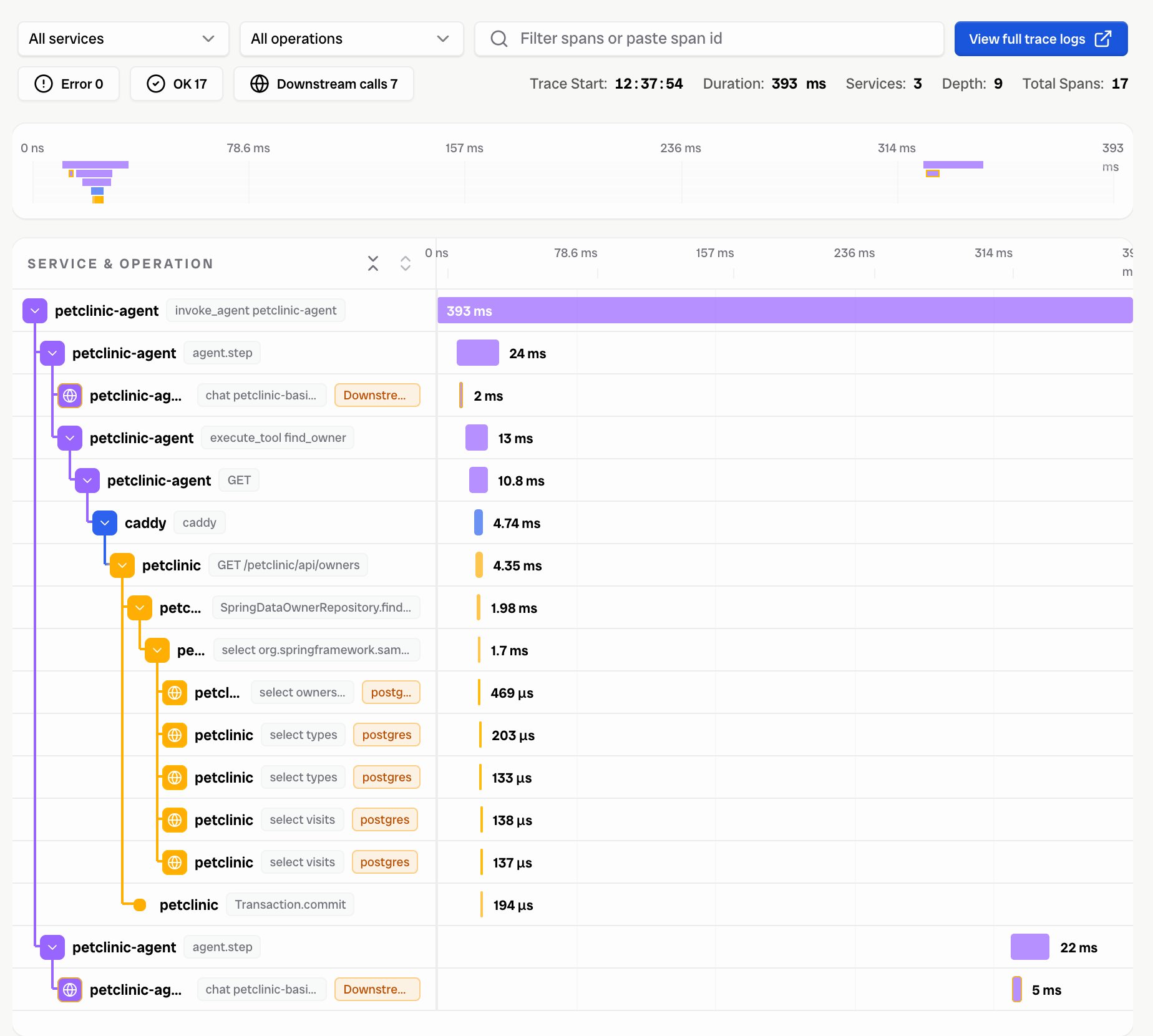
The same trace in Explore Traces: 17 spans from 3 services, from the agent turn down to the SQL statements.
traceparent: check propagateContextUrls (Step 1), and check that no proxy in between strips the header.
To link logs to the trace, log the trace ID. Vercel’s log drain does this for you: runtime log lines from a traced request carry traceId and spanId. In the other service, OpenTelemetry log bridges and the Collector’s json_parser (with a trace setting) set the trace context on log records.
What you’ll see that Vercel can’t show
- Network time to the other service. The client span on the Vercel side minus the server span on the other side is the time spent between them. In one test, a call from a function in
iad1to a backend ineu-west-1took 313 ms, of which the backend needed 26 ms. Moving the function todub1brought the call down to 23 ms. - Where a slow request spends its time, down to individual database statements.
- Errors that the Vercel side hides, for example a
400from the backend that an agent turns into a friendly “I couldn’t do that”.
Known limits
- Vercel’s trace view (
vercel traces get <request-id>or the dashboard) shows the outgoing call as a single span. It doesn’t receive spans from other services. - eve starts a trace per agent turn, and Vercel’s infrastructure spans for eve’s requests form their own traces. Within a turn, the trace stays connected.
- AI Gateway continues the caller’s trace (the gateway’s spans carry the same trace ID) when you also have an AI Gateway trace drain. The gateway’s root span refers to a parent span that isn’t exported, so it shows as a second root in the same trace.