> ## Documentation Index
> Fetch the complete documentation index at: https://docs.bronto.io/llms.txt
> Use this file to discover all available pages before exploring further.
# Fastly
> Stream Fastly CDN service logs to Bronto in real time using a real-time log streaming endpoint to monitor edge traffic, errors, and cache performance.
## Overview
As part of this feature, Fastly provides an option to send data to generic HTTPS endpoints. In this document, we describe how to leverage this feature in order to send Fastly service logs to Bronto.
## Setup
### API Key
* First an **API key** is required in order to be able to successfully ingest data into Bronto. To generate an API key in Bronto, please refer to the [API Keys documentation](/Account-Management/API-Keys).
### Fastly Logging Configuration
The logging configuration is set per Fastly service (CDN or Compute).
* From your CDN Services in Fastly, Select the Service you wish to collect logs from.
* Click the Service configuration tab
* Click the Logging option on the left sidebar
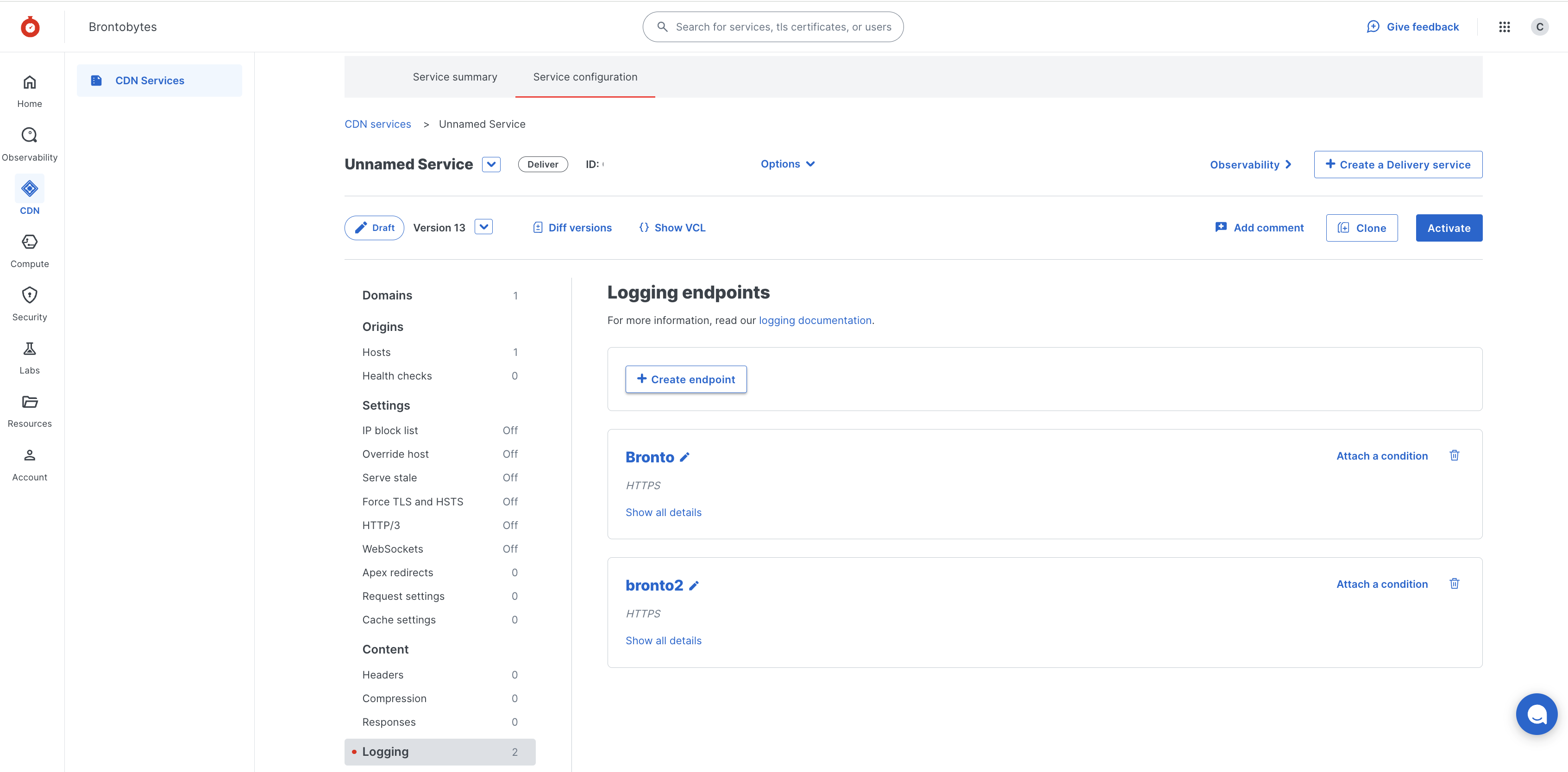 * From here select **Create an Endpoint** option, select **HTTPS** and then **Create endpoint**
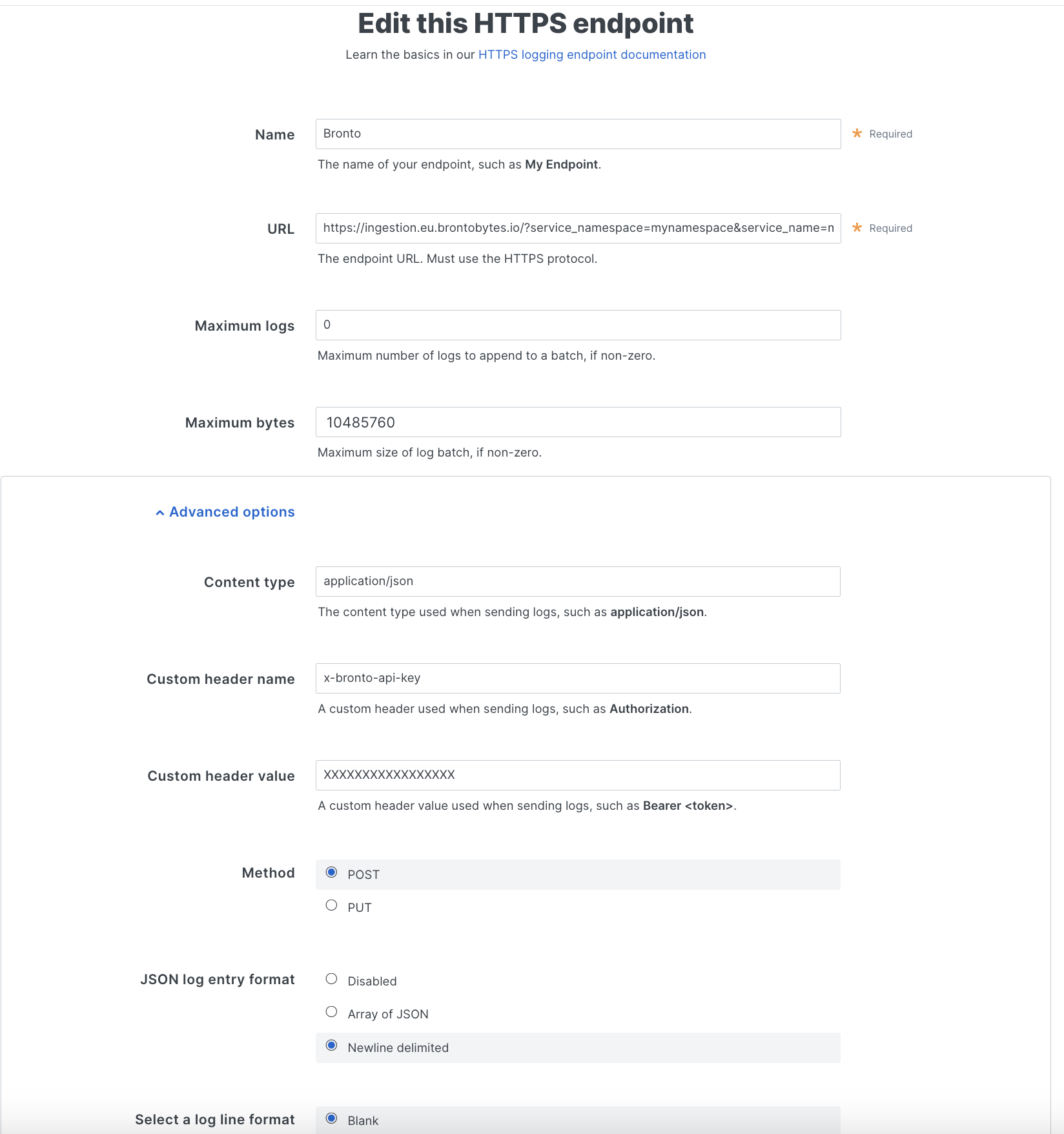
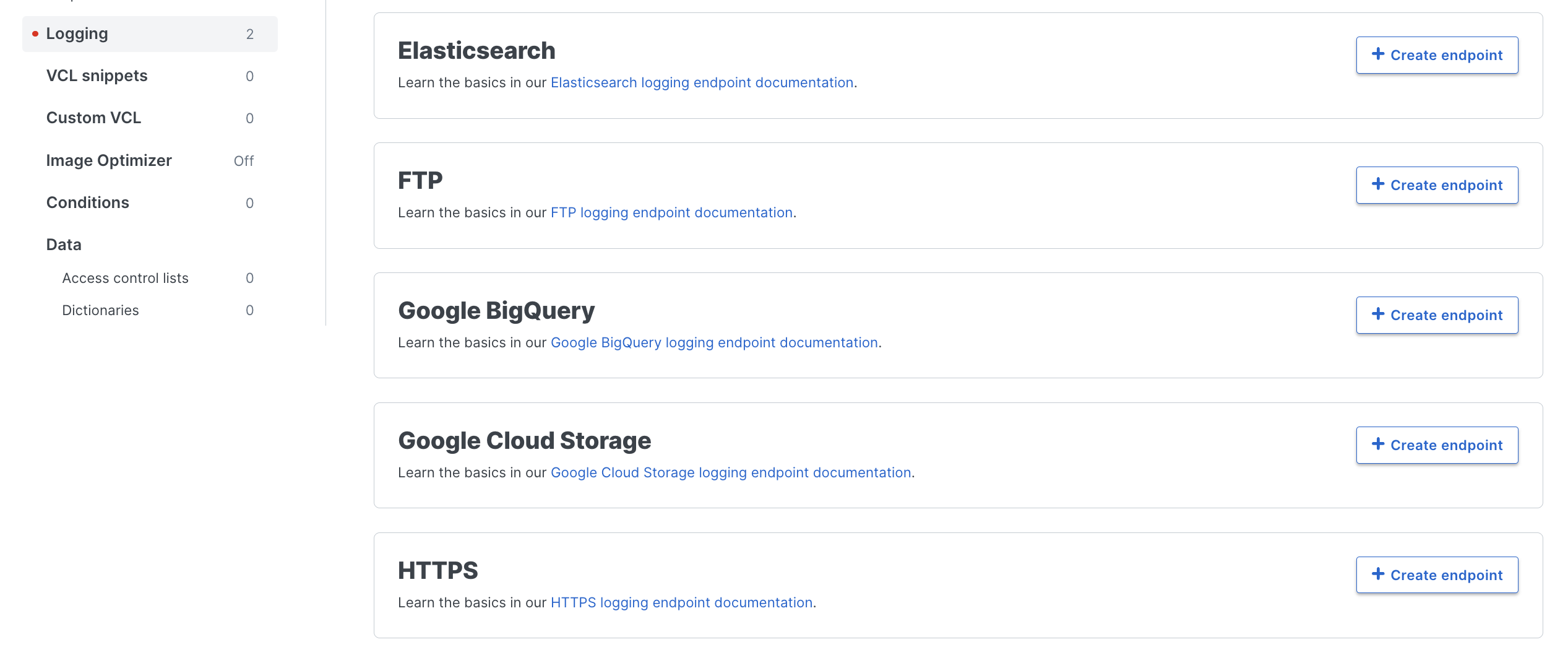 * Fill in the details required which include:
* **Name:** Name of the endpoint to create
* **Placement:** Format Version Default
* **Log Format:** See example below which can be copied
* **URL:** The URL to the Bronto ingestion endpoint. service\_name and service\_namespace query parameters can be passed to the URL in order to define the location of the log data in Bronto for example:
```url URL example theme={"dark"}
https://ingestion.eu.bronto.io/?service_name=@field.host&service_namespace=fastly_cdn_service
```
* **Maximum logs:** Max number of log lines sent in a single batch. Bronto does not enforce a limit, so the value can be left 0
* **Maximum bytes:** Max number of bytes sent in a single batch. Bronto accepts payload up to 10MiB, so this should be set to 10485760
* Next Select **Advanced Options** and fill out the required fields:
* **Content Type:** The content type used when sending logs. **Required:** application/json.
* **Custom header name:** A custom header used when sending logs. **Required:** x-bronto-api-key
* **Custom header value:** A custom header value used when sending logs. **Required:** The Bronto API key previously generated
* **Method:** **Required:** POST
* **JSON log entry format:** **Required:** Newline Delimited
* **Select a log line format:** Blank
* **Compression:** Zstandard
* Finally, select Save or Update
See below for an example configuration:
* Fill in the details required which include:
* **Name:** Name of the endpoint to create
* **Placement:** Format Version Default
* **Log Format:** See example below which can be copied
* **URL:** The URL to the Bronto ingestion endpoint. service\_name and service\_namespace query parameters can be passed to the URL in order to define the location of the log data in Bronto for example:
```url URL example theme={"dark"}
https://ingestion.eu.bronto.io/?service_name=@field.host&service_namespace=fastly_cdn_service
```
* **Maximum logs:** Max number of log lines sent in a single batch. Bronto does not enforce a limit, so the value can be left 0
* **Maximum bytes:** Max number of bytes sent in a single batch. Bronto accepts payload up to 10MiB, so this should be set to 10485760
* Next Select **Advanced Options** and fill out the required fields:
* **Content Type:** The content type used when sending logs. **Required:** application/json.
* **Custom header name:** A custom header used when sending logs. **Required:** x-bronto-api-key
* **Custom header value:** A custom header value used when sending logs. **Required:** The Bronto API key previously generated
* **Method:** **Required:** POST
* **JSON log entry format:** **Required:** Newline Delimited
* **Select a log line format:** Blank
* **Compression:** Zstandard
* Finally, select Save or Update
See below for an example configuration:
 For CDN logs, it is possible to specify the format of each log entry, for example:
```json /etc/fastly/fastly.conf theme={"dark"}
{
"timestamp": "%{strftime({"%Y-%m-%dT%H:%M:%S.%f%z"}, time.start)}V",
"client_ip": "%{req.http.Fastly-Client-IP}V",
"geo_country": "%{client.geo.country_name}V",
"geo_city": "%{client.geo.city}V",
"host": "%{if(req.http.Fastly-Orig-Host, req.http.Fastly-Orig-Host, req.http.Host)}V",
"url": "%{json.escape(req.url)}V",
"request_method": "%{json.escape(req.method)}V",
"request_protocol": "%{json.escape(req.proto)}V",
"request_referrer": "%{json.escape(req.http.referer)}V",
"request_user_agent": "%{json.escape(req.http.User-Agent)}V",
"response_state": "%{json.escape(fastly_info.state)}V",
"response_status": %{resp.status}V,
"response_reason": %{if(resp.response, "%22"+json.escape(resp.response)+"%22", "null")}V,
"response_body_size": %{resp.body_bytes_written}V,
"fastly_server": "%{json.escape(server.identity)}V",
"fastly_is_edge": %{if(fastly.ff.visits_this_service == 0, "true", "false")}V
}
```
Congratulations, once the Fastly service logging configuration is activated data will begin to flow to Bronto. Please note it can take some time for the Service and Service Namespace to be created and for logs to flow.
### Using Event Fields for Service Name and Namespace
You can configure service name and namespace parameters within the URL to dynamically fetch values from log event content using the format @field.key.
```url Service Name Using geo_countr theme={"dark"}
https://ingestion.eu.bronto.io/?service_name=@field.geo_country&service_namespace=fastly
```
In this example, the geo\_country value from the event content will be utilized as the service name.
Once setup, logs for each field will go to the relevant Service in Bronto which allows you to send the log events per service using multiple HTTPs logging endpoints with Fastly.
For CDN logs, it is possible to specify the format of each log entry, for example:
```json /etc/fastly/fastly.conf theme={"dark"}
{
"timestamp": "%{strftime({"%Y-%m-%dT%H:%M:%S.%f%z"}, time.start)}V",
"client_ip": "%{req.http.Fastly-Client-IP}V",
"geo_country": "%{client.geo.country_name}V",
"geo_city": "%{client.geo.city}V",
"host": "%{if(req.http.Fastly-Orig-Host, req.http.Fastly-Orig-Host, req.http.Host)}V",
"url": "%{json.escape(req.url)}V",
"request_method": "%{json.escape(req.method)}V",
"request_protocol": "%{json.escape(req.proto)}V",
"request_referrer": "%{json.escape(req.http.referer)}V",
"request_user_agent": "%{json.escape(req.http.User-Agent)}V",
"response_state": "%{json.escape(fastly_info.state)}V",
"response_status": %{resp.status}V,
"response_reason": %{if(resp.response, "%22"+json.escape(resp.response)+"%22", "null")}V,
"response_body_size": %{resp.body_bytes_written}V,
"fastly_server": "%{json.escape(server.identity)}V",
"fastly_is_edge": %{if(fastly.ff.visits_this_service == 0, "true", "false")}V
}
```
Congratulations, once the Fastly service logging configuration is activated data will begin to flow to Bronto. Please note it can take some time for the Service and Service Namespace to be created and for logs to flow.
### Using Event Fields for Service Name and Namespace
You can configure service name and namespace parameters within the URL to dynamically fetch values from log event content using the format @field.key.
```url Service Name Using geo_countr theme={"dark"}
https://ingestion.eu.bronto.io/?service_name=@field.geo_country&service_namespace=fastly
```
In this example, the geo\_country value from the event content will be utilized as the service name.
Once setup, logs for each field will go to the relevant Service in Bronto which allows you to send the log events per service using multiple HTTPs logging endpoints with Fastly.