> ## Documentation Index
> Fetch the complete documentation index at: https://docs.bronto.io/llms.txt
> Use this file to discover all available pages before exploring further.
# API Keys
> Create, manage, and rotate Bronto API keys to authenticate integrations and route telemetry to the correct service in your organization.
## Manage API Keys
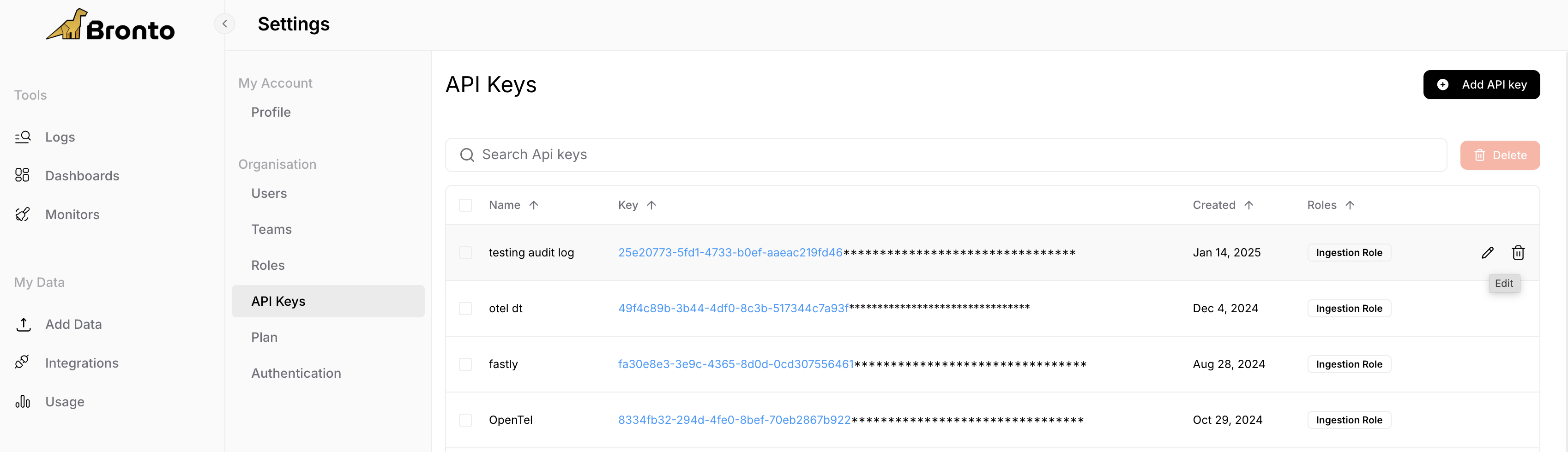
Navigate to the the `Settings > API Keys` item from the application sidebar to manage your API Keys.
 ## Create a new API Key
## API Key Roles[](https://docs.bronto.io/manage/manage-api-keys#api-key-roles)
Bronto allows users to specificy roles in order to limit what resources an api key can access. We currently provide the following roles:
| Role Name | Description | Required for following features |
| --------- | -------------------------------------------------------------- | ------------------------------------------------------------ |
| Admin | Access to all read write permissions on an account | Creating API Keys |
| Search | Read permissions for an accounts data | Interacting with [Rest API](https://docs.brontobytes.io/api) |
| Ingestion | Used for writing and sending data to a service in your account | Data ingestion |
## Edit API Keys
* Within the API Key page, hover over a key you wish to edit, click pencil icon that appears on the right side
* Here you can edit the roles assocaited with the key and the key name
* Under Permissions we list the various part of the product this given key can interact with
## Deleting API Keys
* Within the API Key page hover over a key you wish to permenantly delete
* Select the trash icon to delete
* **Note:** Deleting a key will permanently impact any services currently using it and revoke any access where it is being used.
## Create a new API Key
## API Key Roles[](https://docs.bronto.io/manage/manage-api-keys#api-key-roles)
Bronto allows users to specificy roles in order to limit what resources an api key can access. We currently provide the following roles:
| Role Name | Description | Required for following features |
| --------- | -------------------------------------------------------------- | ------------------------------------------------------------ |
| Admin | Access to all read write permissions on an account | Creating API Keys |
| Search | Read permissions for an accounts data | Interacting with [Rest API](https://docs.brontobytes.io/api) |
| Ingestion | Used for writing and sending data to a service in your account | Data ingestion |
## Edit API Keys
* Within the API Key page, hover over a key you wish to edit, click pencil icon that appears on the right side
* Here you can edit the roles assocaited with the key and the key name
* Under Permissions we list the various part of the product this given key can interact with
## Deleting API Keys
* Within the API Key page hover over a key you wish to permenantly delete
* Select the trash icon to delete
* **Note:** Deleting a key will permanently impact any services currently using it and revoke any access where it is being used.